
A sales pipeline that moves itself, straight from the conversation
Keeping a sales pipeline up to date is normally manual work: someone drags the card, forgets to move it, or discovers a lead parked in one stage for weeks. In SDRBOT.ai the pipeline is a kanban with two connected boards — one for what the AI is doing, another for what the sales team is negotiating — and the card changes column on its own as the conversation advances: the AI SDR replies, qualifies, creates the handoff, and the card shows up ready for the sales rep, with nobody dragging anything.
Build my SDR free →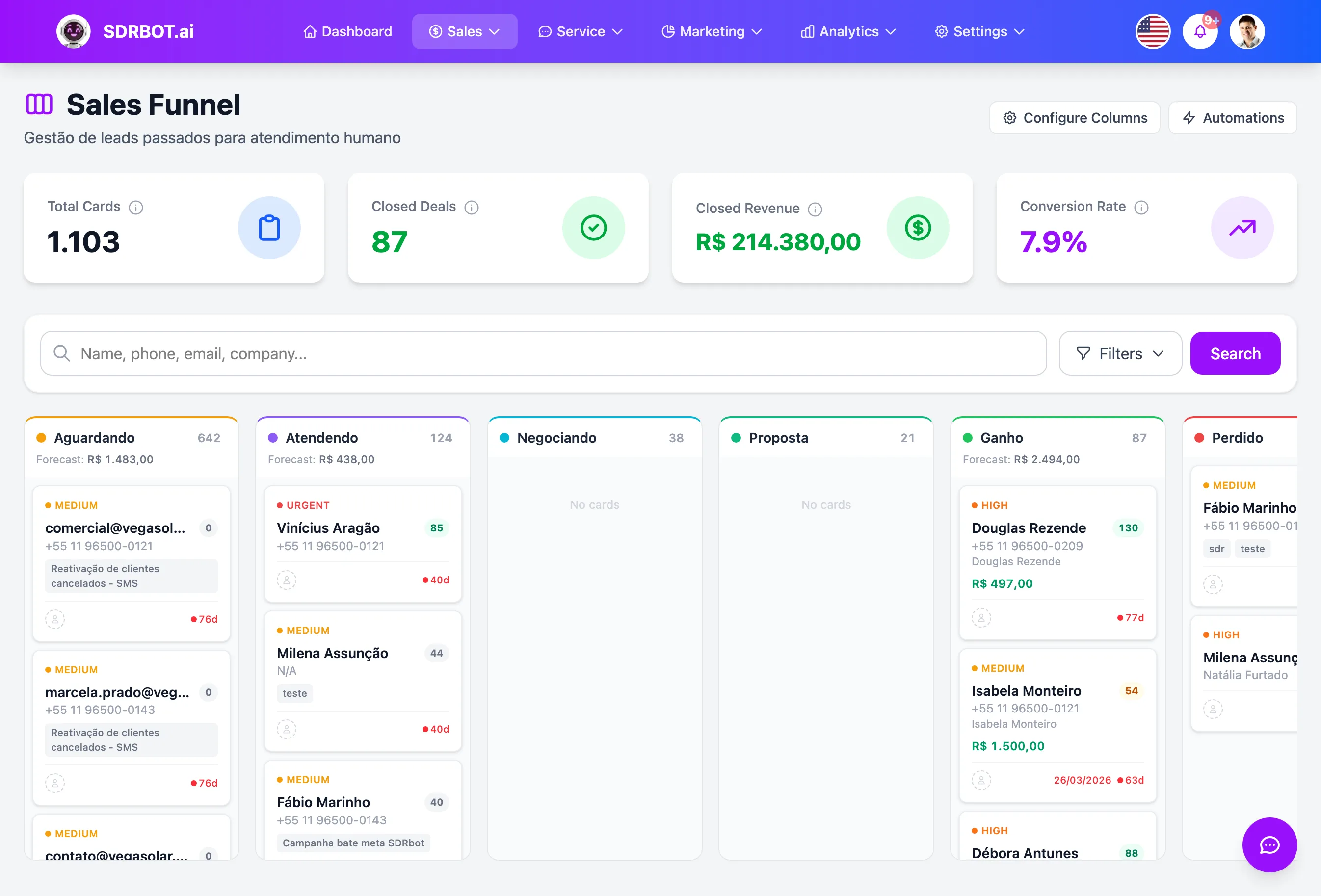
Two boards, one journey end to end
The SDRBOT.ai pipeline is split across two connected boards, not one generic board trying to represent everything. The SDR Pipeline (AI) follows each lead while the conversation is still with the AI SDR, with a card always tied to the lead — never to a specific conversation — moving through the stages New Lead, In Conversation, Qualified or Lost.
The Sales Pipeline only exists from the moment a handoff is created, and each card there is tied to that handoff, not to the lead directly — what matters here is the deal itself, with the stages Waiting, In Service, Negotiating, Proposal, Won or Lost. The same lead coming back to negotiate later produces a new handoff and, with it, a new sales card, without mixing the previous deal's history into the current one.
The card changes column the moment the conversation moves
The SDR Pipeline automation kicks in once the lead already has a card on the board: when the AI SDR sends its first reply to that lead, or when the lead interacts back in the conversation, the card leaves New Lead and goes to In Conversation on its own, with nobody dragging anything. On the sales board not even that is needed: the card is born alongside the handoff, without waiting for any manual action.
That same automation engine covers the rest of the sales side: when a human agent takes the conversation over, the card goes to In Service; when a deal value is recorded in the conversation, to Negotiating; when the proposal is marked as sent, to Proposal; and when the deal closes — won or lost — the card ends in Won or Lost. Each of those changes is fired by the real event in the conversation, not by a routine sweeping the database every so often.
That does not take control away from the team: any card can still be dragged manually between columns when someone wants to skip ahead or correct a stage — the automation covers the common path, it does not replace the judgment of whoever is negotiating.
A handoff becomes a sales card automatically
When the AI SDR identifies that the lead is ready for a sales rep — whether by score or because the lead asked to speak with a person — the handoff is created and, along with it, a new card is born straight into the Waiting column of the Sales Pipeline. The sales rep does not have to open the kanban and create that card by hand: it is already there, waiting, the moment the conversation changes hands.
That sales card is a separate record, tied to the handoff — not to the lead directly — with its own history of movement across In Service, Negotiating, Proposal, Won or Lost. Every handoff opened for that lead produces a new sales card, so the manager follows each deal separately, even when the same lead comes back to negotiate more than once over time.
Everything that matters, visible on the card
Each card in the pipeline shows, without opening anything, the priority (a colored dot, not another line of text shouting MEDIUM or URGENT), the lead's qualification score and, on the sales board, the deal value in a prominent spot. One click on the card opens the conversation or the handoff behind it, depending on which board you are looking at.
In columns with many cards, the list loads in batches as you scroll, instead of freezing the whole page trying to render hundreds of cards at once — useful for operations with a large volume of simultaneous leads in the pipeline.
What changes for your team
- Two boards, one journeyFrom the first AI contact to the closed deal, without losing the thread.
- It moves itselfThe card changes column as the conversation advances, with no dragging.
- A handoff is born a cardWhen the AI passes the lead to a person, the sales card is already there.
- Priority and value in viewScore, priority and deal value right on the card, with nothing to open.
Frequently asked questions
Do I have to move the cards manually between pipeline stages?
No, for most of the flow: once the lead has a card in the SDR Pipeline, it moves from New Lead to In Conversation on its own as the AI works, and it becomes a sales card automatically when the handoff is created. Even so, any agent can drag a card manually when they want to skip ahead or correct a stage.
How does a lead qualified by the AI reach the sales rep in the pipeline?
The moment the AI creates the handoff, a new card is born straight into the Waiting column of the Sales Pipeline — the sales rep does not have to hunt for the lead anywhere or create that card by hand, it appears ready as soon as the conversation changes hands.
Does the pipeline show the deal value on each card?
Yes, in the Sales Pipeline the deal value appears prominently on the card itself, updated as soon as someone records that value in the conversation — no separate report needed to know what each opportunity is worth. The SDR Pipeline card, on the other hand, has no such field — the deal value only exists from the moment the sales handoff is created.
Can the same lead appear more than once in the pipeline?
It can. The SDR Pipeline card is always one per lead, but every handoff opened for them produces a new sales card — if the lead comes back to negotiate months later, the earlier deal stays on record and a new one starts from scratch, without mixing the two.
Works together with
Built for: Solar Energy Real Estate SaaS & B2B