Quick replies so the agent never types the same sentence twice
Every agent has those five sentences they type over and over each day: "Good morning, how can I help?", the catalog link, the text of the return policy. In SDRBOT.ai those sentences become quick replies — saved once for the whole organization, sent with a text shortcut or a click, right inside the Service Center, without leaving the conversation to copy and paste from somewhere else.
Build my SDR free →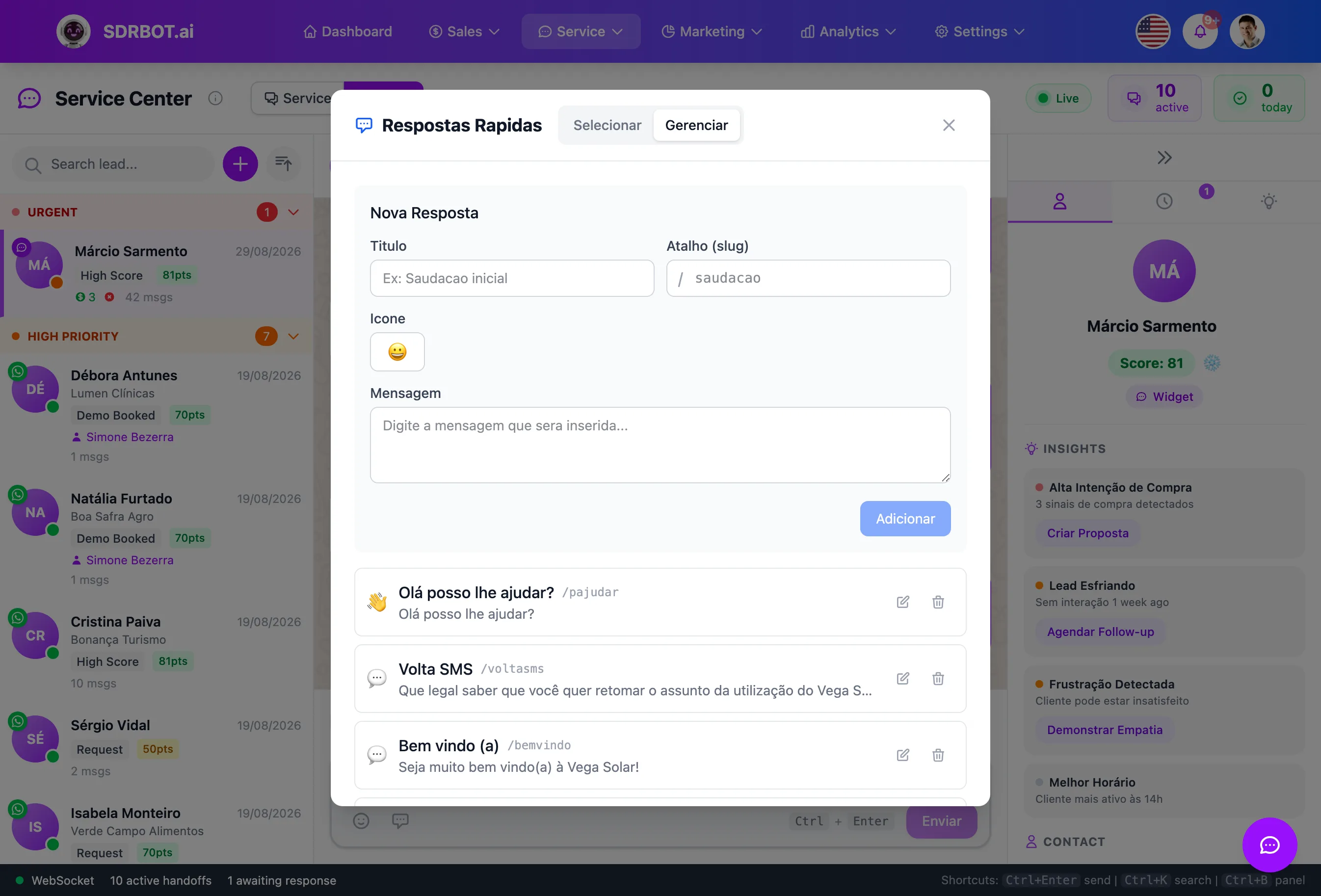
Two ways to use them, mid-conversation
During a conversation, the agent types "/" followed by the saved shortcut (for example "/welcome") and the message field suggests the matching reply to insert with a single Enter — no menu to open. Whoever prefers to browse visually opens the quick replies panel, searches by title or by shortcut, and inserts the message with a click.
The two ways coexist: agents who memorize the shortcuts they use most type them directly, and whoever is still learning the team's vocabulary browses the list until it sticks. This behavior works on any channel handled by the Service Center — it is not a WhatsApp-only function, though WhatsApp is usually where the volume of repeated messages runs highest.
Simple setup, shared by the organization
Each quick reply has a title, a shortcut (slug), an icon and the message text, and it is created right in the chat management panel — without depending on technical support or touching any system configuration. The replies stay available only to the organization that created them, so teams on different accounts on the same platform never see or use each other's replies.
Editing the text of an existing reply automatically updates what the whole team sees from that moment on. A reply can also be deactivated temporarily without deleting it — it disappears from the day-to-day suggestions, but the count of how many times it was used stays recorded, ready to reactivate if the situation comes back around. There is no small, fixed cap on how many replies an organization can keep, so teams with more elaborate routines can organize everything from the greeting to product-specific policies.
The most used ones rise to the top
The platform counts how many times each quick reply has been used and puts the most frequent ones first in the suggestion list, alongside a shortcut bar highlighting the current favorites. When two replies tie on use count, the next tiebreak is the manual position configured for each one and, last, the alphabetical order of the title — the list never ends up in unpredictable order, even with a large set saved.
That spares the agent from scrolling a long list hunting for the right sentence in the middle of a live conversation — the replies the team leans on most appear first, naturally, without anyone pinning them to the top by hand. That ranking also works as an indirect portrait of which questions and situations recur most in the operation, useful for whoever periodically reviews the team's support script.
A typing shortcut, not a rigid script
Unlike a fixed automated flow, a quick reply is text the agent chooses to insert and can edit before sending — it speeds up typing, but it does not take control of the conversation away from the person handling it.
That matters most in the moments right after the AI SDR has passed the conversation to a person: the agent still wants to sound natural and adapt the reply to that specific lead's context, just without spending time retyping the base text from scratch. It keeps the quick reply as what the name promises — a typing shortcut — and not a substitute for human attention in the conversation.
What changes for your team
- Text shortcutType "/" and the shortcut name — the reply comes up ready to send.
- No retypingRepeated sentences become one click, keeping the tone you already reviewed.
- Usage rankingThe most used replies stay within reach, at the top of the list.
- Editable on the spotIt inserts the ready text, but the agent can still adjust before sending.
Frequently asked questions
How does the agent trigger a quick reply mid-conversation?
By typing "/" followed by the saved shortcut (the slug) in the message field — the platform suggests the matching reply to insert with Enter, or the agent can open the quick replies panel and choose with a click, without leaving the support screen.
Does each agent have their own quick replies?
Quick replies are shared across the whole organization, not created per individual agent — so the entire team uses the same already-reviewed text for the most common questions and situations, instead of each person writing their own version and risking a tone nobody agreed on.
Can I use emojis or icons in the replies?
Yes, each quick reply can have an icon attached, which appears next to the title in the suggestion list and helps identify the right reply faster, especially when the team has many saved and has to choose among similar-looking options.
Works together with
Built for: Gyms Education Healthcare