
Sales automation: rules the pipeline runs by itself
Distributing a card, alerting the right sales rep, changing priority when the deal value goes up — without automation, that becomes manual work repeated on every deal, or a rule that lives only in the head of whoever manages the pipeline. SDRBOT.ai lets you build those rules in a visual builder: you pick a real trigger from the conversation, optionally a condition deciding whether the rule applies, and one or more actions the card carries out on its own, with nobody reviewing deal after deal.
Build my SDR free →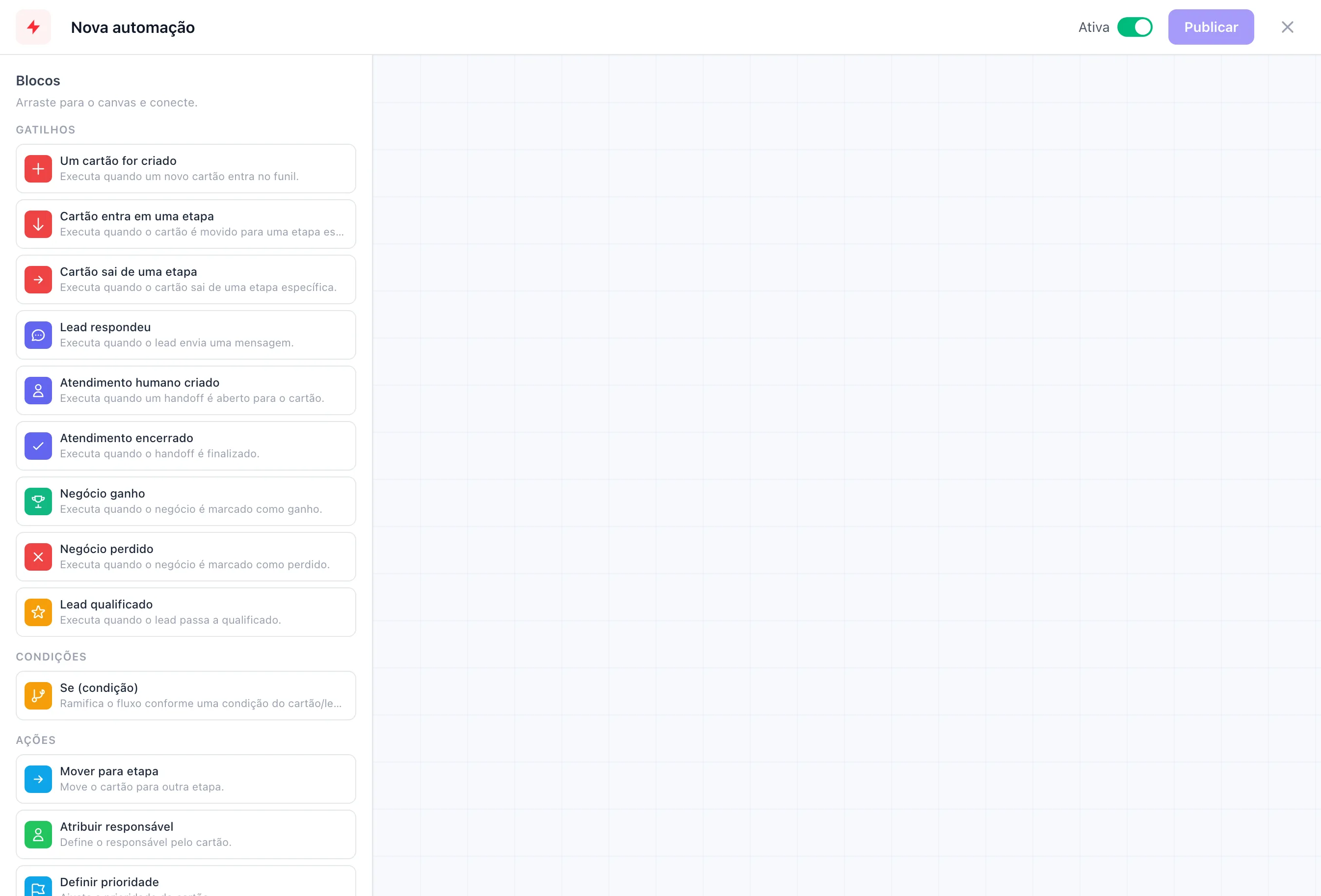
Triggers born from the conversation, not from a timer
Every automation starts from a real trigger: a card was created, a card entered or left a specific stage, the lead replied, a handoff was opened or closed, the deal was marked won or lost, or the lead became qualified. There is no elapsed-time trigger of the 'every day at 9 AM' kind — each automation reacts to something that actually happened in the conversation or on the card.
That means an automation to alert the manager when a large deal is lost fires the instant someone marks that handoff as lost, not on a periodic sweep that could take hours to notice. The same holds for the other available triggers — every one of them tied to a specific event in the operation.
A condition in the middle, so it does not fire every time
Between the trigger and the action, you can slot in a condition node: pick a field — card priority, tags, current stage, deal value, lead score, temperature, qualification status or channel of origin — an operator and a comparison value. The flow follows one path if the condition is true and another if it is false, so the same automation can behave one way when the deal is large and another way when it is not.
That node is optional: simpler automations, like adding a tag whenever a deal is marked won, need no condition in the middle — the trigger fires the action directly.
Actions that really change the card
After the trigger — and the condition, if you use one — the automation carries out one or more real actions on the card: move it to another column, assign it to a specific sales rep, set the priority, add or remove a tag, set a due date in days, leave an internal comment, or notify the person responsible for the card or a specific user.
You can chain more than one action in the same automation — for example, move the card to Negotiating and then notify the responsible sales rep, all from the same deal-value trigger.
The due date set by an action, for instance, is not just a loose note: it lands in the same due field that shows up in the card view, so a due date created by an automation behaves exactly like one an agent would have typed by hand.
Every run is recorded, with no runaway loop
Every time an automation runs, an execution record is kept — whether it succeeded or errored, and exactly which actions were applied to that card. That lets you audit afterward why a specific card changed column or picked up a tag, instead of only noticing that something changed without knowing why.
A change made by an automation does not fire another automation in a chain — there is a specific lock for that — which avoids the scenario of one automation pushing a card that sets off another automation, which sets off another, in a loop that is hard to predict. Each automation can also be switched off individually without deleting it, and the platform records when it last ran.
What changes for your team
- Real triggersFrom card created to deal won or lost, straight from the operation.
- Optional conditionIt only fires the action when field, operator and value match.
- Actions from a menuFrom moving the card to notifying one specific sales rep.
- A record of every runKnow exactly what ran, with or without an error.
Frequently asked questions
Do I need to know how to code to create a sales automation?
No. The builder is visual: you pick the trigger, optionally a condition and the actions in a drag-and-drop editor, without writing a line of code. The automation is ready as soon as you connect the blocks and activate it, and each block already comes with its configuration fields in place.
What kind of condition can I use in an automation?
Card priority, tags, current stage, deal value, lead score, temperature, qualification status or channel of origin — each with the operators that make sense for it, such as contains for tags and greater than or equal to for value and score.
Can one automation set off another in a chain without me noticing?
No. Changes made by an automation do not go on to fire other automations on the same board — that lock exists precisely to prevent a loop of automations setting each other off out of control, even with several automations active at once in the pipeline.
Is there a way to switch an automation off without losing its setup?
Yes. Each automation has an active or inactive switch — turning it off stops it firing from then on, but keeps the trigger, the conditions and the actions configured, ready to switch back on when it makes sense again. That is useful for pausing a seasonal rule without losing the work of building it from scratch later.
Works together with
Built for: Agencies & Consulting Financial Services SaaS & B2B