
A Service Center for your company WhatsApp
WhatsApp became the main sales and support channel for most businesses, but working it without structure comes down to one cell phone, one app, and conversations getting lost between agents. The SDRBOT.ai Service Center organizes that flow: official WhatsApp Business stays connected to the platform, the AI SDR talks and qualifies first, and the human team steps in through the same screen — queue, priority and history in plain view — when the moment calls for a person.
Build my SDR free →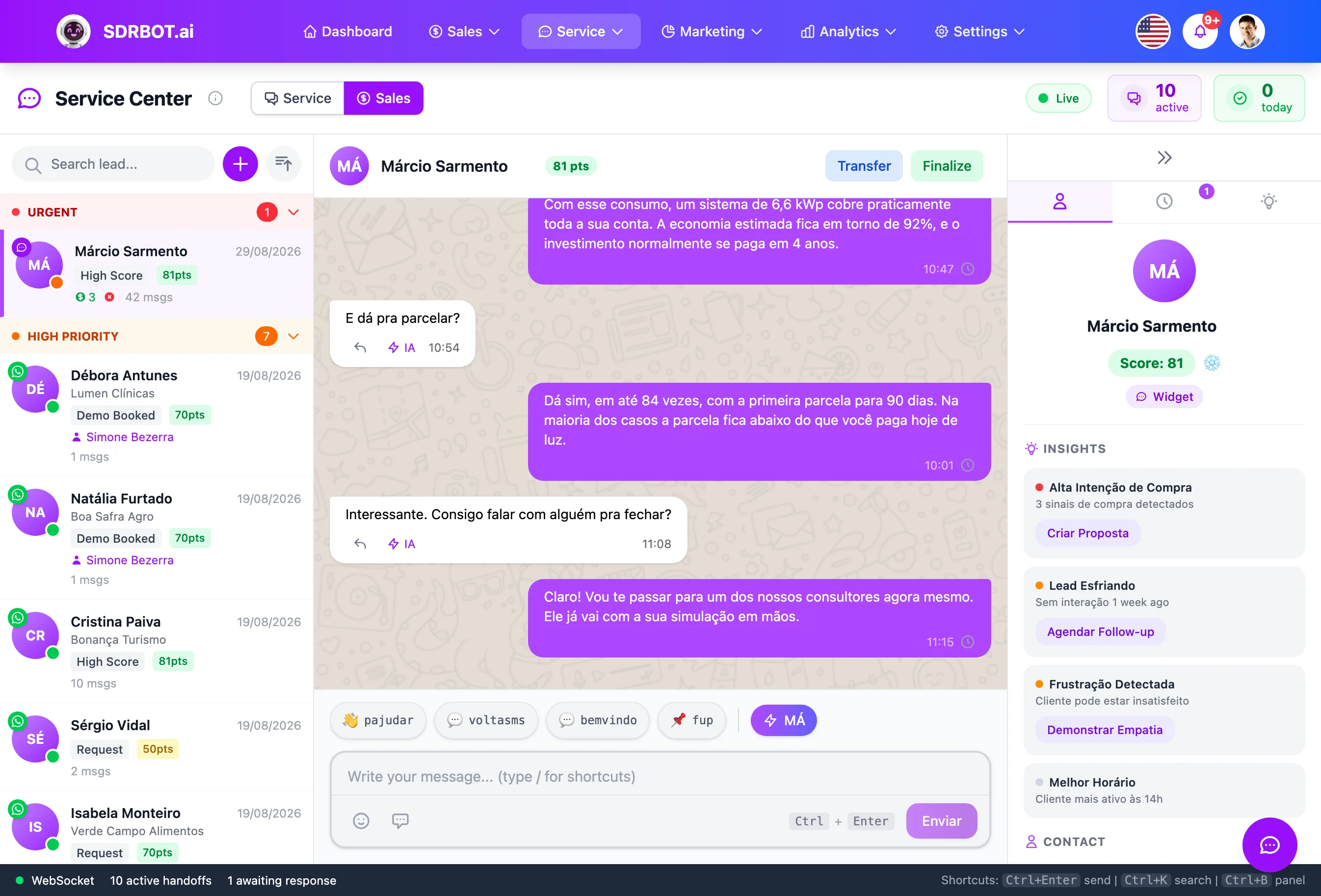
One number, several agents, one queue
WhatsApp Business (the official API, through Meta) stays connected to the platform and every conversation lands in the Service Center — not on a sales rep's personal cell phone. The queue is organized by status (pending, assigned, in service, completed) and by priority, and any authorized agent can see what needs an answer, without depending on someone forwarding it by hand.
That solves the most common problem for operations still running a regular WhatsApp: depending on a single person with access to the handset, and losing the history when that person goes on vacation, changes phones or logs out of the app. The agent can also see, visually, what has been waiting longest for a reply — which helps with priorities instead of relying on memory or asking in the team group who is handling what.
The AI SDR qualifies before the team sees it
Before any agent opens the conversation, the AI SDR has already talked with the lead on WhatsApp, collected qualification information — budget, timeline, interest — and calculated a score. When the conversation reaches a person, whether because the lead asked for one or because a qualification threshold was met, it arrives with that context ready: the agent does not start over asking what the AI SDR already asked.
That shortens the time to the sales rep's first useful reply and avoids the feeling, common in poorly structured support, of being questioned twice by the same company. The qualification history also feeds the on-demand conversation summary, so even an agent who has never spoken with that lead can get oriented within seconds before replying.
Official WhatsApp templates and replies
To re-engage a lead outside the 24-hour free conversation window, or to open a proactive message, the Service Center uses the message templates approved by Meta (HSM) — no messages blocked for breaking platform policy. The team also replies with media, attachments and scheduled messages straight from the same support screen, without opening WhatsApp Web on the side.
That keeps the operation inside the official WhatsApp Business rules, which lowers the risk of the number being blocked for use beyond what Meta allows for business accounts. It matters especially for businesses that depend on periodic re-engagement — chasing a stalled quote, reminding someone of a meeting, restarting a negotiation — without running into the block on non-template messages Meta applies to accounts out of compliance.
History and context always on screen
Every conversation in the Service Center carries the full history of messages exchanged with that lead on WhatsApp, including what the AI SDR asked and answered before any handoff. The agent also sees lead data — name, company, score, temperature — and can pull up the on-demand summary of the conversation's latest messages.
That is particularly useful when a handoff is reassigned between agents: whoever picks it up does not depend on a colleague leaving a manual summary, because the history and the qualification context are already on screen. It also makes auditing easier: if a customer complains about a delay or about wrong information, you can open the conversation and see exactly what was said, by whom — the AI SDR or a person — and when.
What changes for your team
- Official WhatsAppIntegration through Meta's official API, with no block risk from unauthorized use.
- Queue with priorityConversations organized by status and urgency, visible to the whole team.
- The AI SDR goes firstThe lead arrives pre-qualified before any agent joins the conversation.
- Context in viewHistory and conversation summary ready for whoever takes over.
Frequently asked questions
Is this the official WhatsApp Business API or a simulated number?
It is the official Meta integration (WhatsApp Cloud API), with a verified phone number and business account — not a WhatsApp Web automation running outside the platform rules. That lowers the risk of the number being blocked for breaking commercial use policy.
Can several agents use the same WhatsApp number?
Yes — that is the whole point of the Service Center: any authorized agent in the organization sees and answers the conversations of that same number, with shared history and context, without needing physical access to a specific handset or passing one device around the team.
What happens to the lead while no agent is available?
The conversation stays with the AI SDR, which qualifies and replies normally within the rules you configured, and remains visible in the Service Center queue with priority and history ready for whenever an agent picks it up — the lead is not left without an answer just because the team is busy.
Works together with
Built for: Car Dealerships Real Estate Healthcare