
A landing page builder with a visual editor and one-click publishing
Depending on another tool just to build a capture page means one more subscription, one more login and leads that do not arrive automatically in your CRM. SDRBOT.ai has a drag-and-drop visual editor for building the landing page, publishes with one click as soon as the domain is ready, and every submission of the page form creates the lead directly in the platform — with no CSV to export and nothing to integrate on the outside.
Build my SDR free →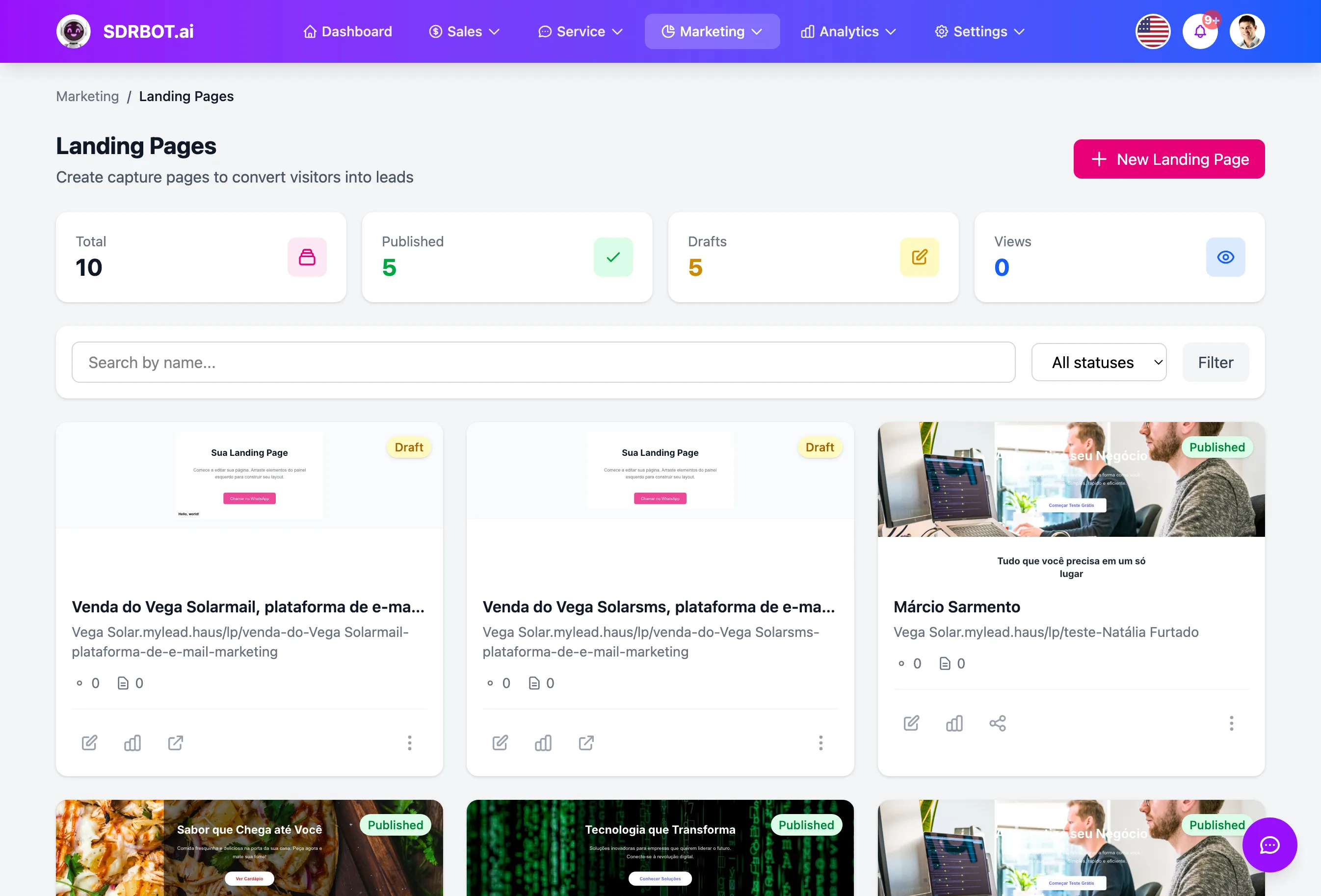
A drag-and-drop visual editor
The page is built in a full visual editor — blocks of text, image, button, form and section dragged and arranged on screen, without writing a line of code or depending on another design tool. It is the same kind of editor used by email marketing tools and professional page builders, embedded directly inside SDRBOT.ai.
To get started faster, you can choose among categories such as real estate, e-commerce, SaaS, education, healthcare or events, alongside the option of starting from a blank screen — each option in the catalog can be viewed before you choose, in a preview modal, so you know how the page looks before you start editing for real. From any starting point, all the content — text, colors, images, form — stays free to edit before publishing.
Publishing really is one click — once the domain is ready
The publish button itself is simple: one click changes the page status to published and it goes live immediately. Before that, you can also open a preview of the genuinely rendered page in a new tab, to check the final result without publishing just to test. What has to be ready before publishing is the domain the page will live on — and here there are two quite different paths.
A subdomain of the platform itself is verified automatically, on the spot, with no DNS configuration at all. A domain of your own (your .com, for example) requires pointing a real DNS record — verification only completes when the platform finds that record genuinely active, which depends on DNS propagation and is not instant.
Your own domain with an automatic SSL certificate
Once your own domain is verified, the platform requests and installs the SSL certificate for that domain by itself — no certificate to buy separately and nothing to configure by hand at your hosting provider. Without that step, most browsers would mark the page as not secure, which sinks the conversion rate of any landing page.
Renewal happens on its own too: a daily routine checks which certificates are close to expiring and renews them automatically before the deadline, without depending on someone remembering to renew by hand every few months. That applies to the domain of your own connected to the landing page — it is a provisioning designed specifically for that connection, not for your entire SDRBOT.ai account.
Every form submission is born a lead
The landing page form is part of the page itself — you define the fields in the editor, and every submission creates or updates a lead directly in SDRBOT.ai, without passing through any external integration. That flow belongs to the landing page, separate from the capture forms module you can install on another site.
The page also tracks, day by day, how many visits it received, how many unique visitors and how many forms were submitted, with the conversion rate calculated automatically between the two numbers — the same person reloading the page several times on the same day counts as a single unique visit, not one per reload. That tracking is available on the landing page management screen itself, without configuring any separate analytics tool to start seeing the number.
What changes for your team
- Visual editorDrag blocks of text, image, button and form, with no code.
- Publishes in 1 clickOnce the domain is ready, the page goes live on the spot.
- Automatic SSLThe certificate is requested, installed and renewed on its own for your domain.
- A submission is a leadEvery form submitted creates the lead directly in SDRBOT.ai.
Frequently asked questions
Do I need to know how to code to build the landing page?
No. The editor is visual, drag and drop — you build the page with blocks of text, image, button, form and section, without writing a line of code. You can also start from a ready-made category, such as real estate or e-commerce, or start from a blank page.
Is publishing the page really just one click?
Yes, but once the domain is ready: a platform subdomain is verified automatically, on the spot; a domain of your own needs a DNS record pointed correctly first, which depends on propagation and is not instant. With the domain ready, publishing changes the page status right away.
Do I have to buy and install an SSL certificate on my domain?
No. Once your own domain is verified, SDRBOT.ai requests and installs the SSL certificate automatically, and renews it on its own before expiry with a daily routine. You do not have to buy a certificate separately or touch any server configuration.
Does the lead who fills in the landing page form land straight in the CRM?
Yes. Every submission of the page form creates or updates a lead directly in SDRBOT.ai, with no spreadsheet to export and no external integration to configure. That flow belongs to the landing page, separate from the forms module you can install on another site.
Works together with
Built for: Agencies & Consulting Education Solar Energy