
A WhatsApp API to wire leads, messages and events into your system
When the company WhatsApp already runs on SDRBOT.ai, it makes sense for your own system to talk to it too, without exporting a spreadsheet or copying data by hand. The SDRBOT.ai API authenticates through a key belonging to the organization and lets you send WhatsApp messages, create and read leads, and subscribe to webhooks that tell your system when something important happens.
Build my SDR free →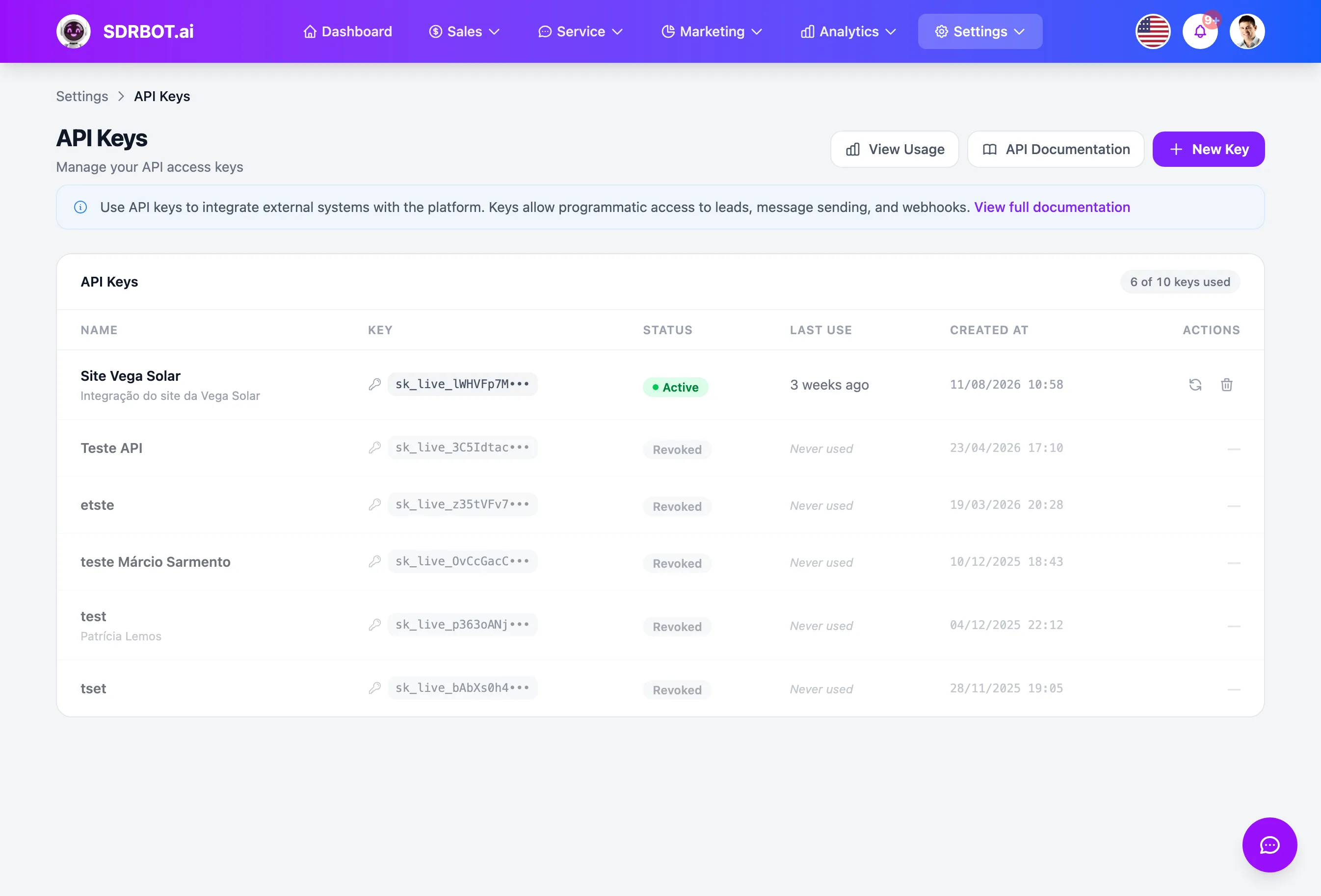
Key authentication, with no user password
Each call is authenticated by an API key belonging to the organization, not by a user's password. The key is generated on the API keys screen, available to whoever holds the Owner or Administrator role, and sent in the request header. The full key is shown only once, at the moment of creation; after that, even the platform stores only a hash of it, not the original value.
Each organization can keep up to 10 active keys at a time — useful for giving each integrated system a key of its own, and revoking only that one if a system is retired, without affecting the other integrations. Every call made with a key is recorded, feeding a per-key API usage dashboard.
Send a message, manage a lead, all with the same key
With the API key you can send a WhatsApp message — text, approved template, image, video, document or audio — identifying the lead by ID, by phone number or by WhatsApp user identifier; if the contact does not exist as a lead yet, it is created on the spot. A lead who has already asked not to be contacted again does not receive a message through this route, even if the call is made — the platform blocks that send before it goes out.
The same key also gives access to the lead records — create, read, update and delete — and to sending messages over RCS, when that channel is active in the organization. For a message outside the WhatsApp 24-hour free conversation window, the API requires a template already approved by Meta, with the right variables filled in — the same rule that applies to any manual send from the platform.
Webhooks tell your system, without you having to ask
Instead of polling the API every so often, you can register a webhook and choose which of the ten available events matter — lead created, lead updated, lead qualified, lead changed WhatsApp number, message received, message sent, handoff created, handoff closed, deal won or deal lost. As soon as the event actually happens on the platform, your endpoint receives the notification, with nothing to ask for.
Each webhook delivery is signed with a key belonging to that webhook, so your system can confirm the notification really came from SDRBOT.ai, and it retries automatically, at a growing interval, if your endpoint does not answer the first time. You can check the delivery history of each webhook and force a new attempt manually when it makes sense, straight through the API itself.
Documentation and testing, without leaving the platform
The API documentation is published inside the platform itself, with endpoints, parameters and call examples organized by area — leads, messages, RCS and webhooks — always aligned with what is genuinely available today. There is no separate developer portal to request access to. There is also an endpoint listing the events available to subscribe to, useful for discovering programmatically which webhooks to configure without opening the documentation in another tab.
Each registered webhook also has a test button, which fires a sample call to your endpoint on the spot, useful for confirming the integration is receiving the right data before depending on it in production. API consumption counts toward the same message usage metric of your plan, so it is not a separate limit to keep track of.
What changes for your team
- A key of your ownAuthentication by organization key, revocable at any moment.
- Messages and leadsSend WhatsApp and RCS, and manage leads through the same API.
- 10 webhook eventsFrom lead created to deal won, signed and with automatic retry.
- Living documentationEndpoints, examples and webhook testing right in the platform.
Frequently asked questions
How does API authentication work?
Through a key belonging to the organization, generated on the API keys screen by whoever holds the Owner or Administrator role, sent in the request header. The full key appears only once, at creation; after that not even the platform stores the original value, only a hash of it.
Can I send a WhatsApp message straight through the API?
Yes. You can send text, an approved template, image, video, document or audio, identifying the lead by ID, phone number or WhatsApp identifier — if the contact does not exist as a lead yet, it is created automatically. Leads who asked not to be contacted again are blocked from that send.
How do I get notified when something happens, without polling the API?
By registering a webhook for the events that matter — lead created, lead qualified, message received, handoff closed, deal won, among others. Each notification is signed so you can confirm the origin, and the platform retries automatically if your endpoint does not answer the first time.
Is there any usage limit on the API?
Consumption per message sent counts toward the same message metric of your plan, not a separate quota to manage. You can also keep up to 10 active API keys per organization, each with its own call history recorded for reference.
Works together with
Built for: Agencies & Consulting Financial Services SaaS & B2B