
WhatsApp delivery report: one log, four sources
The AI SDR, a human agent, a campaign and automatic re-engagement, each sending messages on its own account, also means four different places to find out what actually left your WhatsApp account on any given day. The SDRBOT.ai Delivery Report joins the four sources in a single table, with the same normalized status for all of them, filters by period, type, status and channel, and CSV export — without opening one screen per source to assemble that full picture by hand.
Build my SDR free →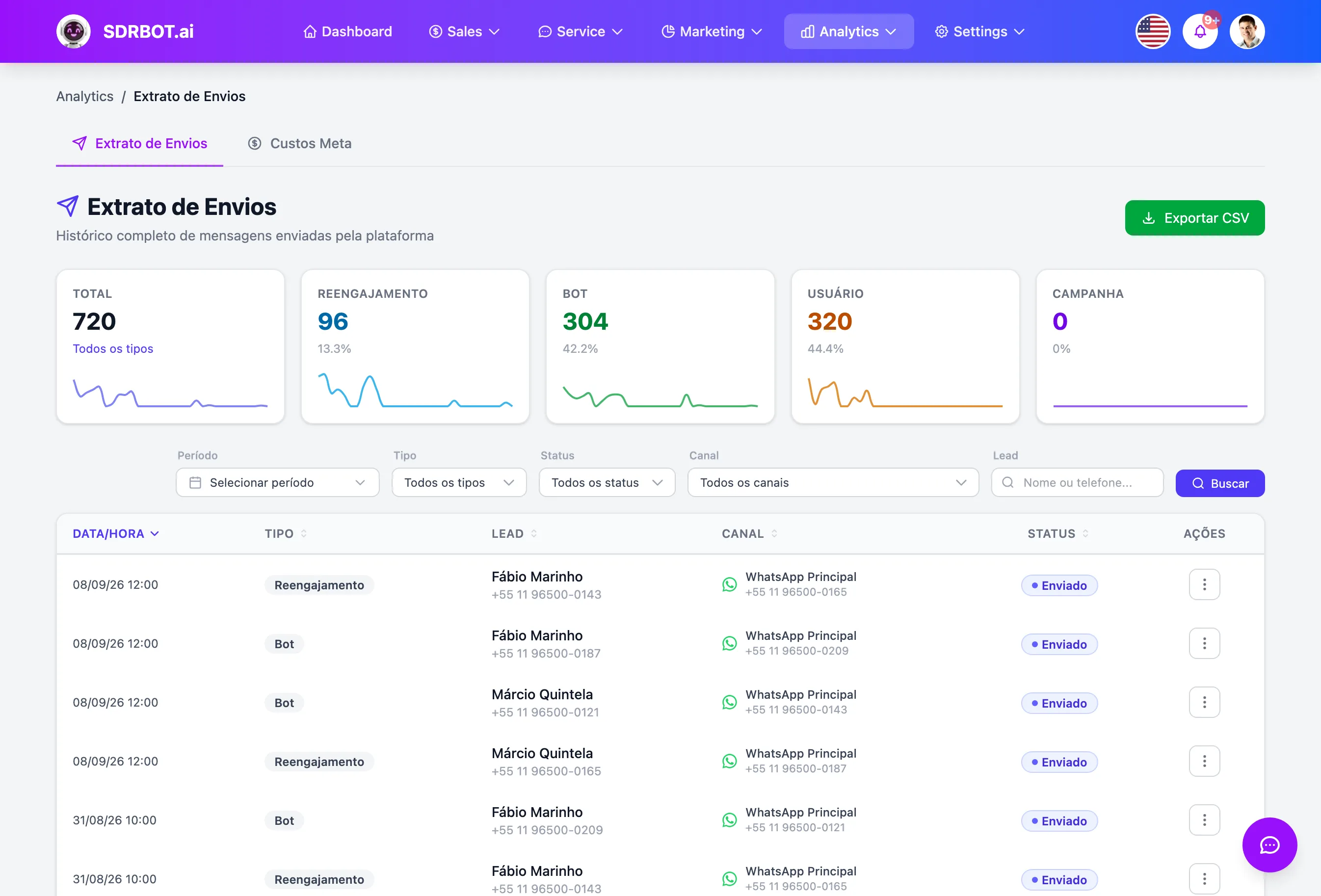
Four sources, one table
The report consolidates four message origins that, without it, would live on separate screens: the automatic re-engagement messages, the AI SDR's replies during the conversation, the messages written by a human agent, and the campaign sends. Each row of the table carries the date and time of the send, the type of origin, the lead, the channel and the status — in the same format, no matter which of the four sources it came from.
That solves a very specific problem: before this screen, each of those four sources either had a report of its own, with logic of its own, or no report at all — there was no single place to see the total volume of messages that left the platform in a period.
Normalized status, with no confusing terms
Each of the four sources originally records the send status in a vocabulary of its own — pending, queued, sent, delivered, read, replied, failed — which would turn any comparison between sources into constant mental translation. The report normalizes all of it into four single statuses: Sent, Delivered, Read or Failed, applied the same way to all four origins.
A send marked as replied — a status that exists only in campaign sends — appears in the report as Read, since in practice a reply from the lead also confirms the message was read before being answered. That normalization is display only: the original data stays stored in its source table, with nothing lost.
Filters by period, type, status, channel and search
Beyond period and type of origin, you can filter by normalized status, by channel and by a free-text search — by lead name or phone number, for example. The channel list is assembled from the WhatsApp, Instagram and Messenger integrations actually connected to your organization, including the ones already disconnected, marked with that note, because the send history of a switched-off channel still exists and has to stay filterable.
The channel shown on each row reflects where the message really went out: automatic re-engagement today is always WhatsApp, but the AI SDR and the human agent show the conversation's real channel — Instagram or Messenger included, when that is where the message was sent.
Preview and export, without leaving the screen
Each row has a preview option that opens a modal with the message's delivery timeline — Sent, Delivered, Read or Failed — highlighting which of those steps that particular send stopped at, without opening the whole conversation just to confirm whether a message arrived.
When the volume calls for analysis off screen, the CSV export respects the filters applied at that moment — period, type, status, channel and search — and comes out with encoding prepared to open correctly in Excel, without the broken accents that usually show up in a plain text export.
That same preview also shows the text of the message sent, so you can check the exact content that went out to that lead without opening the full conversation or downloading the CSV just for that one check.
What changes for your team
- All 4 sources, one reportRe-engagement, the AI SDR, the human agent and campaigns, together.
- No mental translationSent, Delivered, Read or Failed, always in the same standard.
- Disconnected channels tooThe history of a switched-off channel stays filterable.
- CSV exportReady to open in Excel, respecting the filters you applied.
Frequently asked questions
Does the report only show messages sent over WhatsApp?
Automatic re-engagement today always goes over WhatsApp, but the AI SDR and the human agent appear with the conversation real channel — Instagram and Messenger included, when that is where the message went out. Bulk send campaigns enter the report too.
Why does a campaign send show as Read and not Replied?
Because the report normalizes the statuses of the four sources into a single vocabulary, and replied — which exists only in campaigns — becomes Read, since a reply confirms the message was read first. The original data stays stored; this is only the normalized display.
Can I filter a WhatsApp channel that has already been disconnected?
Yes. The channel list includes active and disconnected integrations — the disconnected ones appear with that note in the name — because the send history of a channel that went offline still exists and has to stay filterable in the report. That keeps you from losing the trail of old messages just because the integration was switched off or swapped for a new number later.
Does the CSV export respect the filters I applied on screen?
Yes. The exported file brings only the rows matching the period, type, status, channel and search applied at the moment of export, with encoding ready to open correctly in Excel, without breaking the accents in names and messages. Each column header comes out translated, ready to open straight into a spreadsheet with nothing to rearrange before analyzing.
Works together with
Built for: Agencies & Consulting Financial Services Franchises