
Bulk messaging on WhatsApp with real targeting
Sending the same message to your entire base, with no filter, is the fastest way to get marked as spam. SDRBOT.ai segments your base by temperature, score, tags and more than a dozen criteria before sending, tests two versions of a message at the same time whenever you want, and turns whoever did not reply into a new remarketing campaign ready to review and send — without leaving the campaigns screen.
Build my SDR free →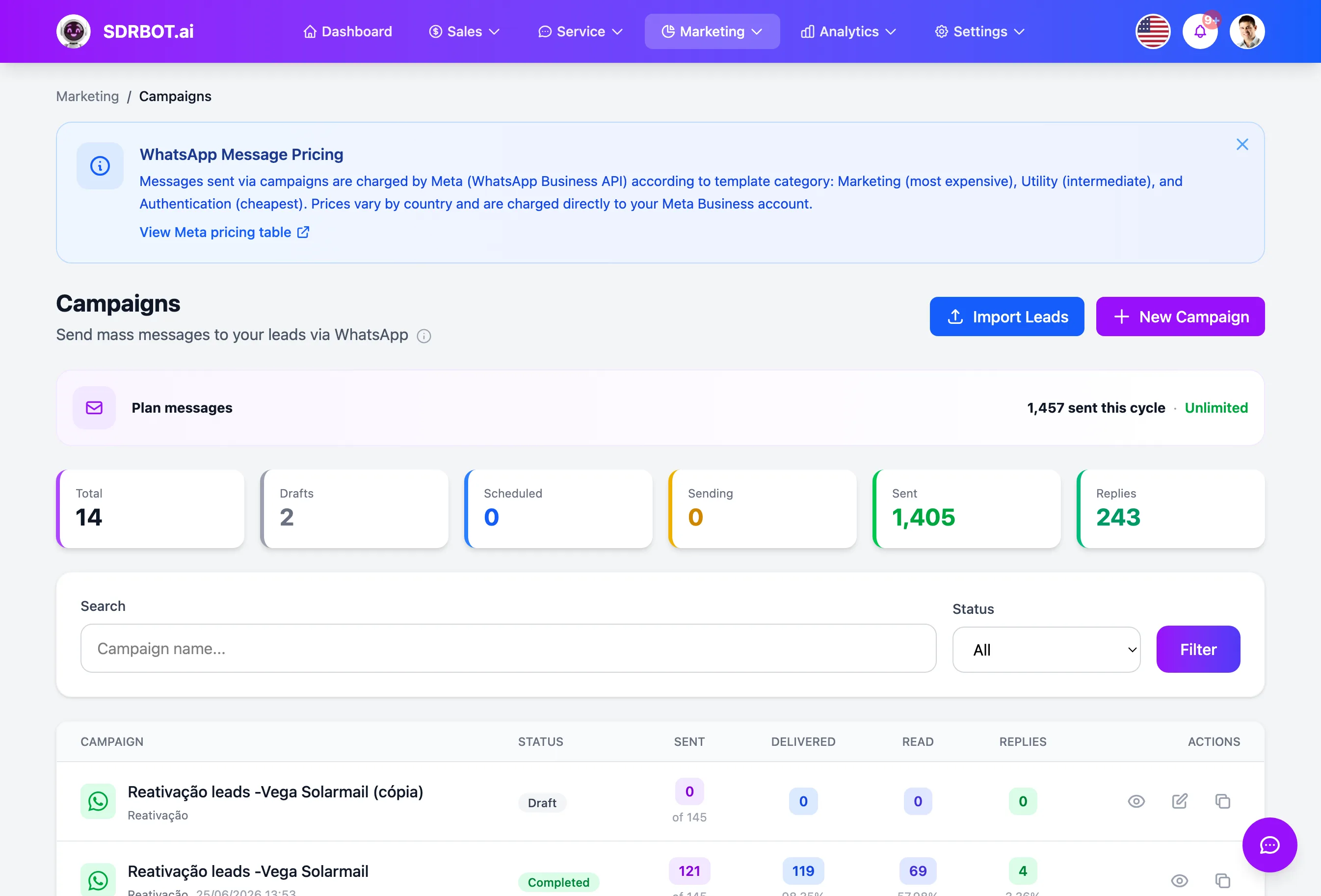
Who gets the message is not your entire base
Before any send, you choose exactly who enters the campaign — not the entire base at once. The SDRBOT.ai audience builder combines more than a dozen criteria: lead temperature, qualification status, score range, company size, channel of origin, days of inactivity, specific tags, whether they already have an open handoff, plus excluding anyone who asked not to receive messages or who already received a recent campaign.
Those filters combine with one another, so you can assemble a very specific audience — Warm leads who mentioned a particular product and did not convert over the last few weeks, for example — without exporting a spreadsheet or asking help from someone who knows databases. The result is a list calculated on the spot, always from the real data in your CRM.
The message goes out personalized, at the right pace
Each message can use variables such as the lead's name or other fields from their own record, replaced automatically with each contact's real data at the moment of sending — it is not one generic text fired identically at everyone. Bulk messaging works today for WhatsApp and RCS; campaigns on other channels are not available yet.
The platform also controls the sending pace automatically, message by message, instead of dumping the whole list at once — a precaution that exists precisely to lower the risk of a block for use outside the pattern Meta expects from a business account. A scheduler runs in the background the whole time, checking every minute whether a scheduled campaign has reached its send time.
An A/B test decided by statistics, not by hunch
A campaign can run with two message variants at once, splitting the audience between them. Each variant keeps numbers of its own — how many sends, deliveries, reads and replies — with delivery rate, read rate and reply rate calculated separately for each, so you can compare side by side even before any statistical conclusion is ready.
When you open that campaign's report, SDRBOT.ai calculates the statistical significance of the result — a proportions test that requires at least 30 sends in each variant before attempting to declare a winner. Only when statistical confidence reaches 95% does the platform officially mark which variant won; below that, the report shows the numbers on each side without forcing a premature conclusion. That same comparison between variants also feeds the AI reading of the campaign, available on the AI campaign insights page.
Whoever did not reply becomes a new campaign, ready to review
After a campaign finishes or is paused, one click on the results screen generates a new remarketing campaign, with the audience already filtered by one of five ready-made cuts: whoever received but did not read, whoever read but did not reply, whoever replied, whoever had a send failure, or whoever was in the variant that lost the A/B test. Before deciding which cut to use, you can also preview how many leads fall into each one, without creating the campaign just to find that number out.
That campaign is born as a draft, ready for you to review the message and send — it is not an automatic resend fired off on its own in the background. That spares the work of assembling the audience filter by hand every time you want to push only on whoever is genuinely worth it, without confusing whoever already converted with whoever simply never opened the message.
What changes for your team
- A made-to-measure audienceMore than a dozen combinable filters, with no spreadsheet to export.
- Controlled paceAutomatic sending at the right pace, so the number is not put at risk.
- A/B with statisticsA winner is declared only at 95% confidence, never on a hunch.
- Remarketing in 1 clickIt generates a new campaign, already filtered by who did not reply.
Frequently asked questions
Can I send the campaign only to the people who really matter?
Yes. The audience builder combines temperature, score, qualification status, tags, channel of origin and other criteria before the send, and already excludes anyone who asked not to receive messages. The result is calculated on the spot, straight from the real data in your CRM, with nothing to export.
How does the campaign A/B test work?
You create two message variants for the same campaign, and the audience is split between them. The winner is declared only when the result reaches 95% confidence, with at least 30 sends on each side — below that, the platform shows the numbers without forcing a conclusion.
Does remarketing fire on its own to whoever did not reply?
No. One click generates a new remarketing campaign, already filtered by a ready-made cut — such as whoever received but did not open, or whoever read and did not reply — but it is born as a draft: you still review the message and decide when to send.
Can I send a campaign on a channel other than WhatsApp?
Today bulk messaging works for WhatsApp and RCS. Each message can use variables such as the lead name, replaced automatically with each contact real data, and the sending pace is controlled automatically to lower the risk of the number being blocked.
Works together with
Built for: Gyms Agencies & Consulting Solar Energy