
Handoff to a human agent without the lead repeating a thing
The worst moment in an AI-run conversation is the switch to a person: the lead repeats everything, the sales rep arrives with no context and the conversation goes cold. In SDRBOT.ai the handoff is a real passing of the baton — the AI SDR delivers the conversation with full history, the qualification score and the data it has already collected, whether on WhatsApp, Instagram, Messenger, RCS or the site widget, and whether the handoff is automatic or decided on the spot by an agent.
Build my SDR free →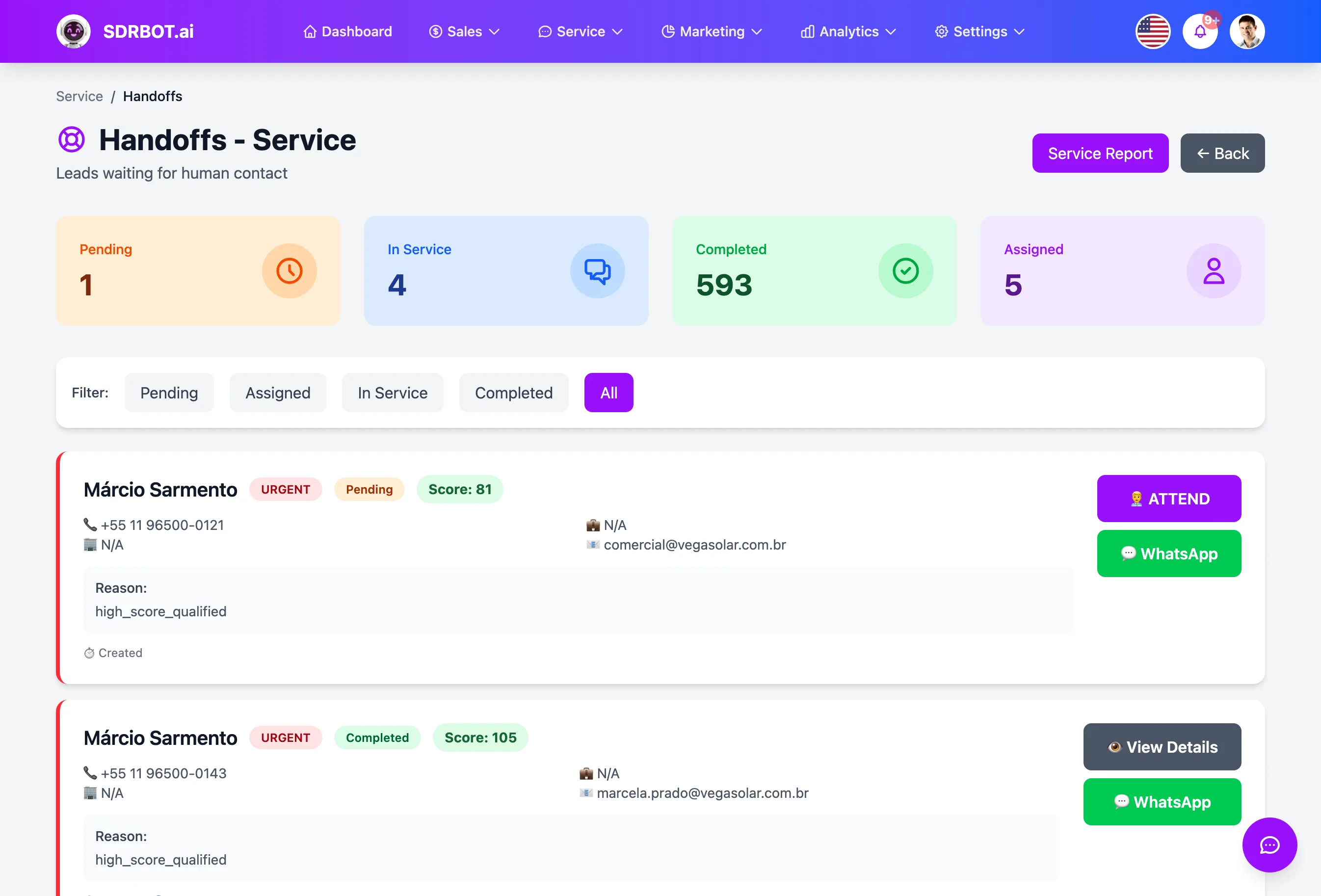
When the AI SDR hands off to a person
The handoff happens in three situations: when the lead asks to speak with a person, when the AI SDR recognizes that the lead has warmed up enough to be worth a sales rep's time, or when an agent decides to take the conversation over manually from the Service Center. In all three the conversation changes hands without changing windows — the lead stays on the same WhatsApp, Instagram, Messenger, RCS or widget where it started.
Those three doors cover both the lead who wants to decide on their own and the lead who has not noticed they are already ready to talk to someone — the AI SDR keeps watching for signs of interest throughout the conversation, and it is that continuous watching that supports the second situation. The third door exists because not every transfer has to wait for an automatic threshold: an agent who already knows that customer, or who simply wants to step into a specific deal, can take over at any moment from the support screen.
The sales rep arrives with the homework done
The transferred conversation carries the full message history, the lead's score and temperature, and the qualification answers the AI SDR has already collected — budget, timeline, interest. No "one moment while I look into your case": the agent reads the summary and picks up exactly where the AI SDR stopped. That holds for the automatic handoff and for an agent taking the conversation over manually — in neither case does the sales rep open an empty screen.
Beyond what the AI SDR collected during qualification, the agent also sees basic lead information, such as name and company, and quickly gets a sense of where the deal stands without scrolling the whole conversation back to the first message. That starting point avoids the most common rework of a botched handoff: the sales rep repeating a question the lead answered minutes earlier, which usually reads as disorganization to the person on the other side.
Who the conversation goes to
You define in the settings which roles can receive transfers — usually sales reps, but managers or administrators too, depending on how your team is structured. The transferred conversation is distributed among those eligible agents by round robin, shortest queue or random draw — the rule is yours, and it holds for the whole organization until you change it.
When only one eligible person is available, the handoff goes straight to them, skipping the distribution calculation. Either way, the conversation enters the Service Center queue with priority and the lead's score visible to whoever picks it up, and it can be reassigned manually to another colleague later if needed — it is the same distribution mechanism used for any handoff on the platform, not a queue reserved for automatic transfers.
The agent sees all of it when taking over manually
Not every handoff waits for the AI SDR's automatic threshold: any authorized agent can click "Take Over Service" right in the Service Center and create the handoff on the spot, without waiting for the lead to ask or for a qualification threshold to be met. On taking over, the conversation's side panel shows the lead header — name, company, and the same temperature and score used everywhere else on the platform — plus metrics such as total messages exchanged, average response time and the channel of origin.
The agent can also generate, on demand, a summary of the conversation with the main points discussed, the lead's level of interest and suggested next steps, without rereading every message exchanged up to that point. It is the same logic as the automatic handoff, only triggered by a human decision — the history, the score and the qualification context stay exactly where the AI SDR left them.
What changes for your team
- No starting overThe lead never repeats information — context travels with the conversation.
- Sales timingThe AI SDR holds a cold lead and calls a sales rep only when it pays off.
- Organized queueDistributed by the rule you chose, with priority and history in view.
- Take over on the spotThe agent can take over manually and finds everything ready on screen.
Frequently asked questions
Does the lead notice the switch from the AI SDR to a person?
The conversation continues in the same channel and the same window — the lead gets no new link and does not have to restart the chat. What changes is who is answering on the other side; if you want, the agent can introduce themselves by name when taking over, but that is a choice of tone, not a technical requirement of the platform.
Do I control when the handoff happens?
Yes. Beyond the lead asking explicitly, you define the qualification criteria that let the AI SDR recognize the right moment to transfer, and an agent can always take over manually from the Service Center, without waiting for any automatic threshold to be met.
What if no sales rep is available?
The conversation stays in the Service Center queue with priority and the lead score visible, and the full history remains available to whoever picks it up as soon as they are free — the lead does not lose their place or have to start the conversation from scratch.
Works together with
Built for: Healthcare Insurance SaaS & B2B